Our Refurbishment Process
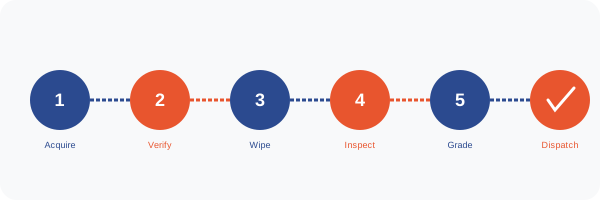
At Back-Markt, every device that enters our facility follows a documented, repeatable process. This page describes each step in detail so you understand exactly what happens before a device reaches you. Transparency is a core value — we publish this process and stand behind it.
Step-by-Step: From Acquisition to Delivery
-
Acquisition & Initial Screening
Devices arrive from trade-in customers, corporate lease returns, and wholesale partners. Every device is logged into our inventory system with a unique tracking ID. An initial visual inspection determines whether the device is worth processing or should be directed immediately to responsible recycling.
-
IMEI / Serial Number Verification
We check every device against the national stolen device database (CheckMEND) and verify that no active finance agreements are attached. Devices that fail this check are quarantined and reported to the relevant authorities. This step protects our customers from unknowingly purchasing compromised devices.
-
Secure Data Destruction
All data is wiped to NIST 800-88 standard before any further handling. For devices with encrypted storage (most modern smartphones and laptops), we perform a cryptographic erase followed by a factory reset. A data destruction certificate is generated and stored against the device's tracking ID.
-
Technical Inspection (72-Point Checklist)
Our certified technicians run the device through a 72-point inspection covering: processor, RAM, storage health, display (dead pixels, brightness, colour), touch response, all cameras, speakers, microphone, battery health and cycle count, all connectivity (Wi-Fi, Bluetooth, cellular, GPS), all ports and buttons, biometric sensors, and charging function. Results are recorded digitally against the device's tracking ID.
-
Cosmetic Assessment & Grading
A separate cosmetic assessor examines the device under standardised lighting conditions. Scratches, dents, cracks, and discolouration are documented and photographed. The device is assigned a grade (A, A-, B, B-, or C) based on the combination of technical and cosmetic results. Devices that do not meet Grade C minimum standards are removed from sale.
-
Repair & Reconditioning (Where Required)
Devices with repairable faults are passed to our repair team. Common repairs include battery replacement, screen replacement, and port cleaning. All replacement parts meet or exceed OEM specifications. After repair, the device re-enters the inspection process from Step 4 to ensure the repair has not introduced new issues.
-
Software Preparation
Devices receive a fresh operating system installation (or factory reset for mobile devices). Windows laptops receive a genuine licensed OS. MacBooks receive the latest compatible macOS. All devices are set to factory defaults with no pre-installed third-party software.
-
Final Quality Check & Packaging
A final quality check is performed by a senior technician who was not involved in the earlier inspection. The device is cleaned, packaged with the appropriate accessories, and labelled with its grade and inspection report reference. The package is sealed and prepared for dispatch.
-
Dispatch & Tracking
Orders are dispatched via tracked courier. Customers receive an email with tracking information as soon as the package is collected. Standard delivery takes 2–3 working days; express next-day delivery is available on orders placed before 2 pm.
Buyer Preparation Checklist
To ensure a smooth experience when your device arrives, we recommend the following:
- Have your Apple ID or Google account credentials ready for device setup
- Back up your old device before transferring data
- Check the inspection report email we send before opening the package
- Inspect the device within 48 hours of receipt and report any discrepancies immediately
- Register your warranty on our website using the device's serial number
- Test all key functions (camera, speakers, connectivity) within the first week
- Keep the original packaging for the duration of the return window
- Note the warranty expiry date and set a reminder if you wish to purchase an extension
- Read the Policies page to understand your rights and our obligations
- Save our contact details: [email protected] / +44 20 7946 0202
- If buying a laptop, have your Wi-Fi password ready for initial setup
- For iPhones, ensure you have disabled Find My iPhone on your previous device before trading in